Review Your Trade Before You Risk Money
Catch chasing, bad entries, and forced trades before you enter. Get direct feedback on your setup before you click.
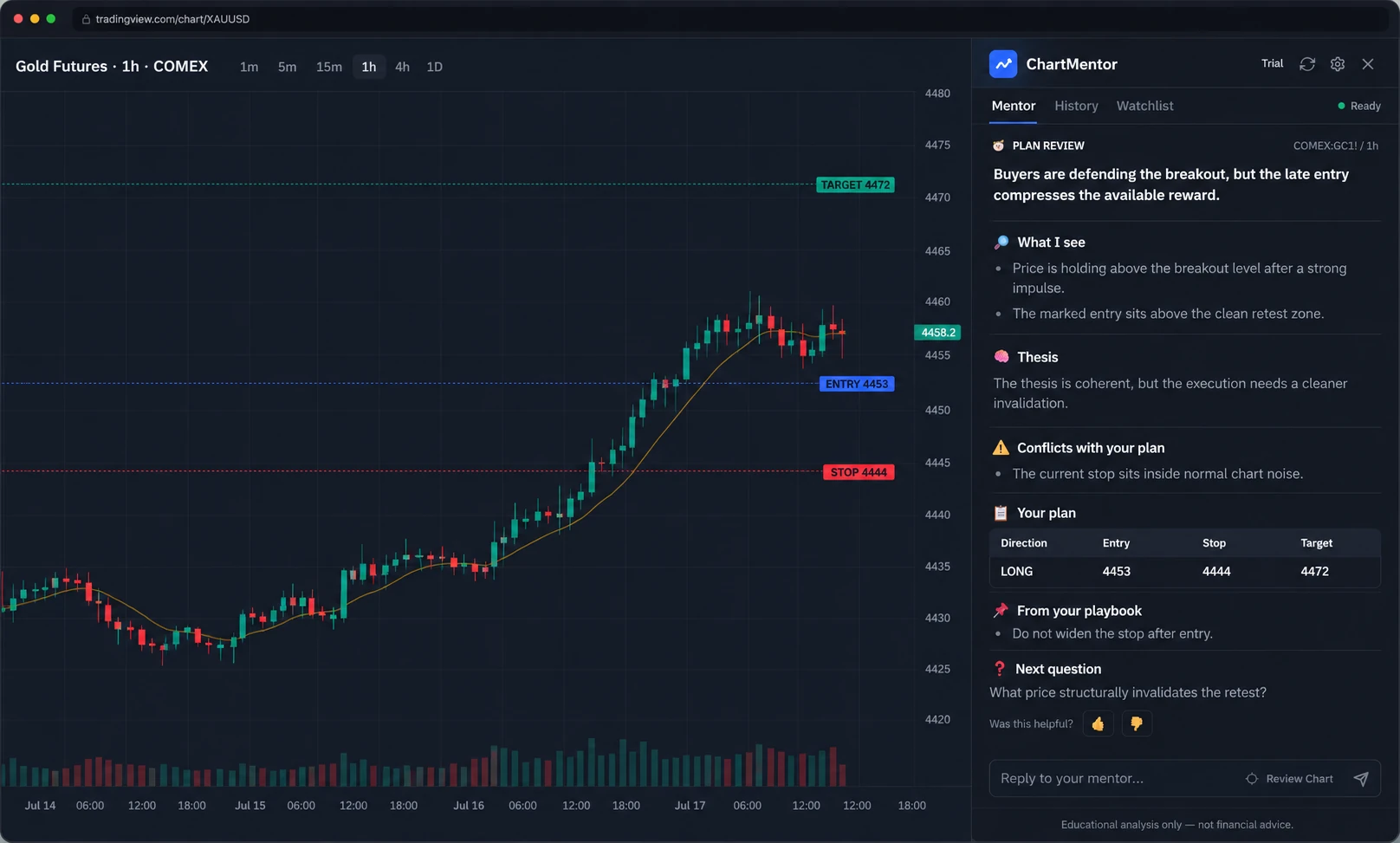
Draw your entry, stop, and target on TradingView, then use Review My Trade to review that exact trade.
30-day money-back guarantee on all paid plans
Example Verdict
BTCUSD | 1D | Pre-trade review
Chasing after a missed entry. Price is already extended from structure.
Wait for a pullback into the demand zone before considering a long. Current entry has poor reward-to-risk.
FOMO is driving the setup. The valid entry was earlier, not here.
See the mistake before you fund it.
ChartMentor turns a chart review into a decision checkpoint: verdict first, mistake next, then the action to take before risking money.
How It Works
Catch mistakes before they cost you. Find Setups scans the chart broadly, and Review My Trade checks your drawn entry, stop, and target directly.
Capture
Open your TradingView chart and click Analyze. In Review My Trade, draw entry, stop, and target first so ChartMentor can review that exact setup.
Review
Get a compact verdict: good setup, weak setup, no trade, or trap risk. See the main mistake and the next action without a long report.
Decide
Use the critique to decide: wait for pullback, avoid entirely, or act only if conditions improve. Signals stay secondary to the review.
5 trade reviews/month included
Need to configure TradingView first? Start with the setup guide.
Choose the right review mode
One product, three practical ways to avoid weak decisions before you enter.
Review My Trade
Draw entry, stop, and target on TradingView. Get a verdict before entering: GOOD SETUP, WEAK SETUP, NO TRADE, or TRAP RISK.
Find Setups
Scan the current chart through your saved strategy. Get zones, triggers, invalidation, and no-trade conditions without forcing a signal.
Pro Market Context
Add cached macro-event, price, session, and crypto benchmark context as a secondary check for forex, crypto, metals, energy, and major futures.
Stop Taking Weak Trades.
See the difference between generic AI chart tools and a pre-trade execution checkpoint.
AI Chart Tools
- Generic AI chart analysis
- Invented setups and signals
- Long explanations before verdict
- Analysis-first mindset
- Education over execution
- Says yes to every setup
Trade Review
- Pre-trade execution checkpoint
- Critique of your specific setup
- Verdict in the first 2 sentences
- Disciplined pause before clicking
- Execution quality over education
- Says no trade when appropriate
Choose how many trade reviews you need
Start with 5 free trade reviews. Upgrade when the pre-trade checkpoint becomes part of your routine.
Free
Try the workflow
- Verdict-first review
- Mistake detection
- Basic Review Lens
Starter
Regular reviews
- Follow-up questions
- Review Lens customization
- Psychology red flags
- Action guidance
Pro
Active traders
- Everything in Starter
- Pro market context
- Macro-event risk
- Price context
- Priority support
Elite
Serious daily workflow
- Everything in Pro
- Weekly mistake digest
- Best model / context configuration
- Dedicated priority support
More trade reviews.
More confidence.
Choose the review volume that matches your workflow.
Frequently Asked Questions
Everything you need to know before getting started.
Still have questions? Start free, no risk.
Start FreeExample Review Scenarios
A breakout looks clean, but the entry is already extended into nearby resistance. The review flags trap risk and asks for a better location before entry.
A long idea appears after a fast move into resistance. ChartMentor focuses the review on entry location, invalidation, and whether waiting is cleaner.
The trader draws entry, stop, and target first. The review critiques that specific setup instead of producing a generic chart-analysis paragraph.
A saved strategy lens keeps the critique consistent: confirmations, invalidation, and no-trade conditions are checked the same way each time.
The review starts with the verdict, then explains the main weakness. That keeps the decision clear when the trader is close to clicking.
On a short-timeframe setup, the review compresses the critique into a verdict, the main risk, and the next action instead of a long report.
Repeated weak-entry flags make the pattern visible: late entries, vague stops, and unclear reward-to-risk can be reviewed before the trade exists.
A trade idea has a target but no clean invalidation. ChartMentor pushes the review back to stop placement and whether the setup is defined enough.
A crowded chart can hide the actual decision. The review calls out conflicting context and asks whether the setup is still clear enough.
The chart idea may be reasonable while the execution is weak. ChartMentor separates setup logic from entry quality and trade management clarity.
A pullback setup lacks confirmation. The review returns a wait condition instead of forcing a signal from incomplete structure.
Past reviews can show recurring setup-quality issues, giving the trader a cleaner starting point for later journal work.
A breakout looks clean, but the entry is already extended into nearby resistance. The review flags trap risk and asks for a better location before entry.
A long idea appears after a fast move into resistance. ChartMentor focuses the review on entry location, invalidation, and whether waiting is cleaner.
The trader draws entry, stop, and target first. The review critiques that specific setup instead of producing a generic chart-analysis paragraph.
A saved strategy lens keeps the critique consistent: confirmations, invalidation, and no-trade conditions are checked the same way each time.
The review starts with the verdict, then explains the main weakness. That keeps the decision clear when the trader is close to clicking.
On a short-timeframe setup, the review compresses the critique into a verdict, the main risk, and the next action instead of a long report.
Repeated weak-entry flags make the pattern visible: late entries, vague stops, and unclear reward-to-risk can be reviewed before the trade exists.
A trade idea has a target but no clean invalidation. ChartMentor pushes the review back to stop placement and whether the setup is defined enough.
A crowded chart can hide the actual decision. The review calls out conflicting context and asks whether the setup is still clear enough.
The chart idea may be reasonable while the execution is weak. ChartMentor separates setup logic from entry quality and trade management clarity.
A pullback setup lacks confirmation. The review returns a wait condition instead of forcing a signal from incomplete structure.
Past reviews can show recurring setup-quality issues, giving the trader a cleaner starting point for later journal work.
A breakout looks clean, but the entry is already extended into nearby resistance. The review flags trap risk and asks for a better location before entry.
A long idea appears after a fast move into resistance. ChartMentor focuses the review on entry location, invalidation, and whether waiting is cleaner.
The trader draws entry, stop, and target first. The review critiques that specific setup instead of producing a generic chart-analysis paragraph.
A saved strategy lens keeps the critique consistent: confirmations, invalidation, and no-trade conditions are checked the same way each time.
The review starts with the verdict, then explains the main weakness. That keeps the decision clear when the trader is close to clicking.
On a short-timeframe setup, the review compresses the critique into a verdict, the main risk, and the next action instead of a long report.
Repeated weak-entry flags make the pattern visible: late entries, vague stops, and unclear reward-to-risk can be reviewed before the trade exists.
A trade idea has a target but no clean invalidation. ChartMentor pushes the review back to stop placement and whether the setup is defined enough.
A crowded chart can hide the actual decision. The review calls out conflicting context and asks whether the setup is still clear enough.
The chart idea may be reasonable while the execution is weak. ChartMentor separates setup logic from entry quality and trade management clarity.
A pullback setup lacks confirmation. The review returns a wait condition instead of forcing a signal from incomplete structure.
Past reviews can show recurring setup-quality issues, giving the trader a cleaner starting point for later journal work.
A breakout looks clean, but the entry is already extended into nearby resistance. The review flags trap risk and asks for a better location before entry.
A long idea appears after a fast move into resistance. ChartMentor focuses the review on entry location, invalidation, and whether waiting is cleaner.
The trader draws entry, stop, and target first. The review critiques that specific setup instead of producing a generic chart-analysis paragraph.
A saved strategy lens keeps the critique consistent: confirmations, invalidation, and no-trade conditions are checked the same way each time.
The review starts with the verdict, then explains the main weakness. That keeps the decision clear when the trader is close to clicking.
On a short-timeframe setup, the review compresses the critique into a verdict, the main risk, and the next action instead of a long report.
Repeated weak-entry flags make the pattern visible: late entries, vague stops, and unclear reward-to-risk can be reviewed before the trade exists.
A trade idea has a target but no clean invalidation. ChartMentor pushes the review back to stop placement and whether the setup is defined enough.
A crowded chart can hide the actual decision. The review calls out conflicting context and asks whether the setup is still clear enough.
The chart idea may be reasonable while the execution is weak. ChartMentor separates setup logic from entry quality and trade management clarity.
A pullback setup lacks confirmation. The review returns a wait condition instead of forcing a signal from incomplete structure.
Past reviews can show recurring setup-quality issues, giving the trader a cleaner starting point for later journal work.
A breakout looks clean, but the entry is already extended into nearby resistance. The review flags trap risk and asks for a better location before entry.
A long idea appears after a fast move into resistance. ChartMentor focuses the review on entry location, invalidation, and whether waiting is cleaner.
The trader draws entry, stop, and target first. The review critiques that specific setup instead of producing a generic chart-analysis paragraph.
A saved strategy lens keeps the critique consistent: confirmations, invalidation, and no-trade conditions are checked the same way each time.
The review starts with the verdict, then explains the main weakness. That keeps the decision clear when the trader is close to clicking.
On a short-timeframe setup, the review compresses the critique into a verdict, the main risk, and the next action instead of a long report.
Repeated weak-entry flags make the pattern visible: late entries, vague stops, and unclear reward-to-risk can be reviewed before the trade exists.
A trade idea has a target but no clean invalidation. ChartMentor pushes the review back to stop placement and whether the setup is defined enough.
A crowded chart can hide the actual decision. The review calls out conflicting context and asks whether the setup is still clear enough.
The chart idea may be reasonable while the execution is weak. ChartMentor separates setup logic from entry quality and trade management clarity.
A pullback setup lacks confirmation. The review returns a wait condition instead of forcing a signal from incomplete structure.
Past reviews can show recurring setup-quality issues, giving the trader a cleaner starting point for later journal work.
A breakout looks clean, but the entry is already extended into nearby resistance. The review flags trap risk and asks for a better location before entry.
A long idea appears after a fast move into resistance. ChartMentor focuses the review on entry location, invalidation, and whether waiting is cleaner.
The trader draws entry, stop, and target first. The review critiques that specific setup instead of producing a generic chart-analysis paragraph.
A saved strategy lens keeps the critique consistent: confirmations, invalidation, and no-trade conditions are checked the same way each time.
The review starts with the verdict, then explains the main weakness. That keeps the decision clear when the trader is close to clicking.
On a short-timeframe setup, the review compresses the critique into a verdict, the main risk, and the next action instead of a long report.
Repeated weak-entry flags make the pattern visible: late entries, vague stops, and unclear reward-to-risk can be reviewed before the trade exists.
A trade idea has a target but no clean invalidation. ChartMentor pushes the review back to stop placement and whether the setup is defined enough.
A crowded chart can hide the actual decision. The review calls out conflicting context and asks whether the setup is still clear enough.
The chart idea may be reasonable while the execution is weak. ChartMentor separates setup logic from entry quality and trade management clarity.
A pullback setup lacks confirmation. The review returns a wait condition instead of forcing a signal from incomplete structure.
Past reviews can show recurring setup-quality issues, giving the trader a cleaner starting point for later journal work.
30-day money-back guarantee on all paid plans